.svg)
Do you need to perform dependency injection while working with Kotlin Multiplatform (KMP)? As...
This week, we're launching the Kotzilla MCP Server. It's a new way to connect your AI coding assistant to real runtime context from your Android and Kotlin Multiplatform app.
The short version: your AI assistant can now go from detecting a production issue to applying a concrete fix, all inside the editor you already use.
Why we built it
AI coding assistants have become a standard part of the Android and KMP development workflow. Claude Code, Cursor, Windsurf, and GitHub Copilot are now used by developers to use every day.
But when it comes to debugging production issues, we keep hearing the same frustration: the suggestions are generic, the fixes don't stick, and the root cause is never quite right.
The reason is straightforward.
Your AI assistant is working blind. It sees your code but not your runtime. It knows your architecture on paper but not how it behaves under real user sessions. So when an ANR lands in Play Console or a crash surfaces on your iOS target, the assistant has nothing meaningful to work with. No dependency graph, no component timings, no session data. Just your code and a best guess.
The Kotzilla MCP Server closes that gap.
What it does
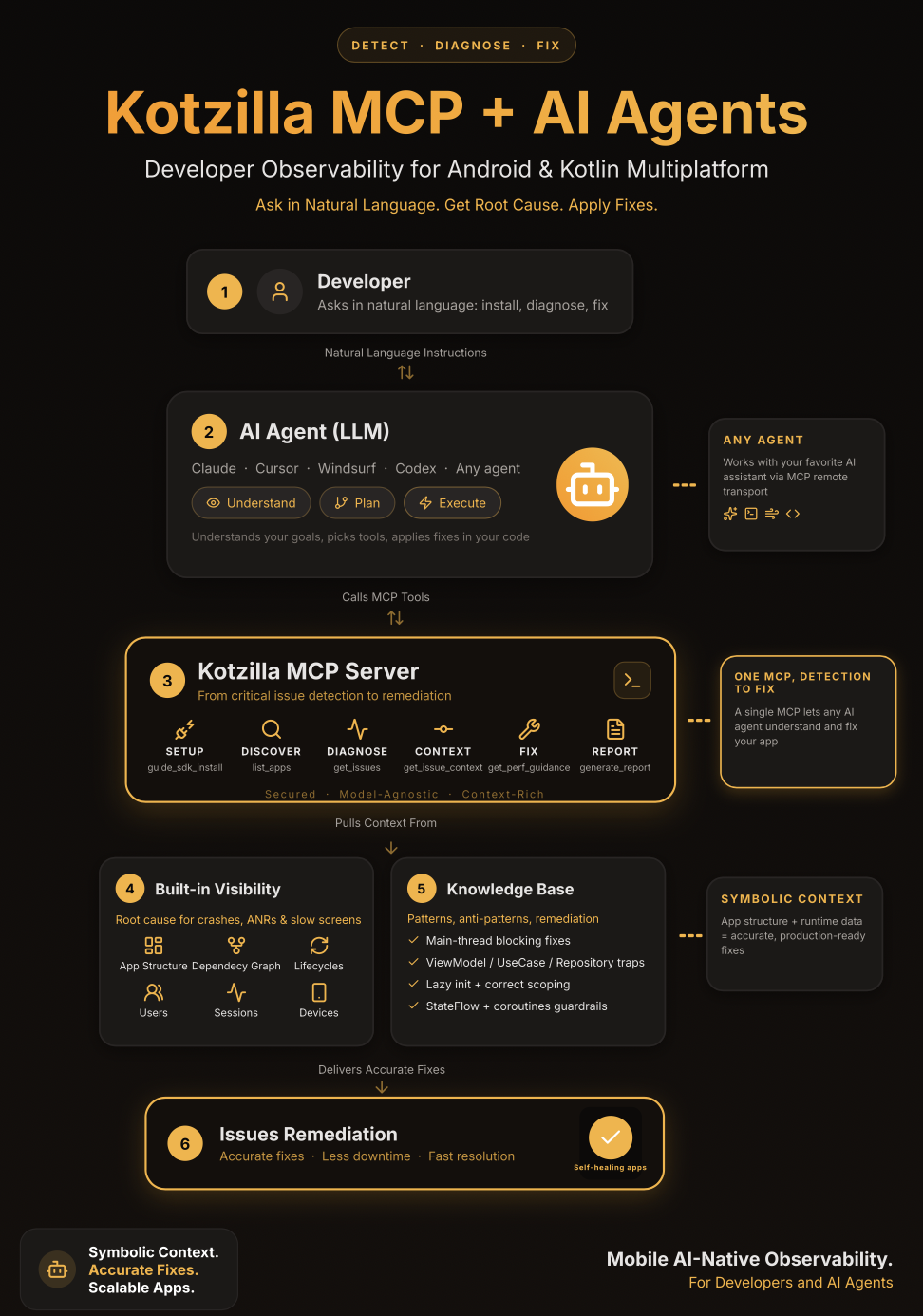
The Kotzilla MCP Server connects your AI coding assistant to the Kotzilla Platform. It gives the assistant the same structural and runtime context Kotzilla captures from real user sessions. It provides dependency graphs, resolution times, crash reports, and component behavior, along with a knowledge base of proven fix patterns for Android and KMP projects.
Once connected, your assistant can:
-
Analyse performance and stability across Android, iOS, Desktop (JVM), JS and WASM targets from real user sessions. Ask for a lint-style performance report, compare two versions to spot regressions, or rank issues by severity across all your registered apps.
-
Identify root causes with full dependency resolution trees and timings, blocking component identification, symbolicated crash traces, and thread-level event analysis.
-
Apply guided fixes directly in your code. The assistant retrieves fix patterns specific to the detected issue type, whether it's blocking calls, eager initialization, heavy ViewModel init, StateFlow strategies, scope misuse. It reads your codebase and applies changes across multiple files under your review.
-
Set up in one prompt. One natural language prompt registers your app, reads your project structure, generates the config file, updates your version catalog and Gradle plugin, and adds the monitoring call to your Koin setup. The whole process takes under a minute
A few things you can ask it
> What are the main performance issues in my app?
> Why is HomeScreen slow?
> Is version 1.2.1 performing better than 1.1.5?
> Show me the crashes on the iOS target of my CMP app and help me fix them
> Which issues should I focus on as the main priority among my apps?
Each query returns real data from your app's production sessions.
Works with the tools your team already uses
The Kotzilla MCP Server works with any MCP-compatible AI coding tool. Claude Code, Cursor, Windsurf, the Android Studio MCP panel, and any LLM-powered terminal assistant. No new tools to adopt, no new dashboards to learn. Your team connects the MCP Server to whatever they are already using and gets better answers immediately.
Security and compliance
All communication between the MCP Server and the Kotzilla Platform is encrypted over HTTPS. The MCP Server operates on the same technical, non-sensitive data collected by the Kotzilla SDK and is fully GDPR-compliant. It does not access any business logic or user-sensitive data from your app.
The Kotzilla MCP Server is free to try.
Full documentation and the quick start guide are available at the link above. If you have questions or feedback, we would love to hear from you.